TruGolf LaunchBox
$2,999 Camera LM — Club Data Without Stickers, Locked Into E6
The TruGolf LaunchBox is the best E6-only launch monitor you can buy, and the club-data-without-stickers feature at $2,999 is legitimate innovation. No marked balls, no club stickers, no subscription — you open the box, set it on the ground, and you're playing Pebble Beach with your real swing data. The E Ink display is brilliant for range practice. But the E6 lock-in is the big asterisk. If you want GSPro — and most informed buyers do — the LaunchBox isn't for you. If you want the simplest no-subscription sim experience with real club data and you're happy in the E6 ecosystem, this is probably your device.
TruGolf TruGolf LaunchBox · $2,999
What We Love
- +Club data WITHOUT stickers at this price — face angle, club path, attack angle measured, no club stickers needed
- +27 owned E6 Connect courses included — zero subscription fee, you own the software forever
- +E Ink display for shot data — readable in direct sunlight, uses almost no battery
- +No marked balls required — tracks unmarked white balls with its dual-camera photometric system
- +4-6 hour battery, 2.7 lbs — genuinely portable for range and sim use
- +Short game performance is surprisingly good — chips and partial wedges read reliably
What Sucks
- −Does NOT support GSPro — you're locked into the E6 ecosystem (E6 Connect Home included, or E6 APEX upgrade $150-450/yr)
- −Club data is in beta — the stickerless club path/face angle measurement works but is still being refined
- −No putting data beyond basic distance — putting needs more development
- −E6 APEX upgrade costs exist if you want the full 3,000+ course library (LaunchBox includes 27)
- −At $2,999 it sits in a competitive no-man's-land — undercut by Square Omni ($1,600) on price, outpaced by GC3 ($5,249) on data depth
Watch It in Action
Who Is TruGolf?
TruGolf has been in the golf sim business for over a decade. They’re one of the OG brands — they build commercial simulators for golf centers, hotels, and pro shops. Their home sim systems (the Vista series) start at $15,000 and go up from there. They have actual engineering pedigree in camera-based tracking systems.
The LaunchBox is their first consumer portable launch monitor. It’s not a startup’s first swing at a new category — it’s an established commercial sim company translating their camera-tracking technology into a $2,999 portable device. That pedigree matters because camera-based launch monitors are harder to build than radar ones. TruGolf has been doing it at the commercial level for years.
What You Get for $2,999
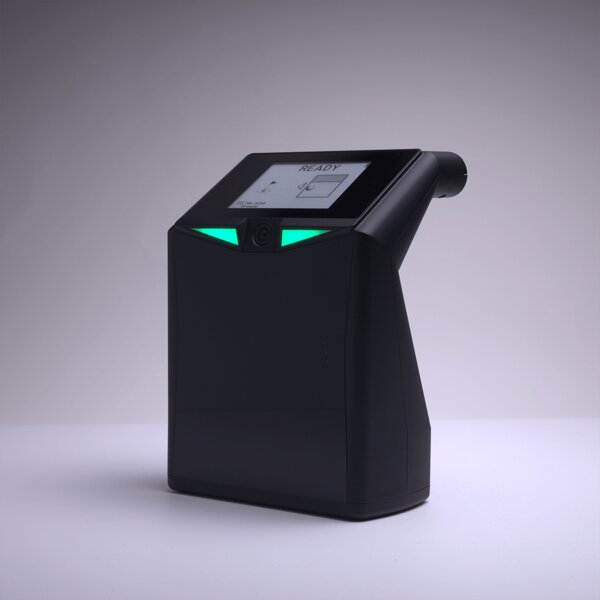
The box is simple. LaunchBox unit, power cable, ethernet cable, USB cable, and an instruction booklet. The unit itself is about the size of an A4 piece of paper standing on its edge — 9.5“ tall, 7“ wide, 5“ deep. 2.7 pounds. You set it on the ground to the side of the ball, pointed at your hitting area, and it uses dual high-speed cameras to track the ball through impact.
The E Ink display on the front is the first thing you notice. Most launch monitors at this price — the Bushnell Launch Pro at $2,499, the SkyTrak ST MAX at $1,995 — require a phone or tablet to see your numbers. The LaunchBox shows you six key metrics right on the device: carry distance, ball speed, backspin, sidespin, vertical launch angle, and horizontal launch direction. E Ink is a great choice for this — it’s readable in direct sunlight, uses almost no battery, and doesn’t wash out like an LCD would.
The headline feature is the camera system. Two high-speed photometric cameras capture the ball at impact and track it through the first few feet of flight. Because it’s camera-based, it measures spin directly from ball rotation — it doesn’t estimate it from flight curvature like radar units do. This means indoor accuracy is excellent, and you don’t need a deep room or long ball flight to get reliable data.
No marked balls needed. The LaunchBox tracks unmarked white golf balls with its camera system. That’s a real convenience advantage over the SkyTrak ST MAX and Bushnell Launch Pro, which need marked balls (callaway dots or similar) for spin measurement. You grab a sleeve of whatever balls are in your bag, set up the LaunchBox, and you’re hitting.
The Club Data Thing — This Is the Big Deal
The LaunchBox measures club path, face angle, and angle of attack without any club stickers. At $2,999.
Let me explain why this matters. Most camera-based launch monitors under $5,000 — the SkyTrak+, the Bushnell Launch Pro at the $2,499 base price, even the Square Golf Omni at $1,600 — cannot measure club data without stickers on the clubface. The GC3 at $5,249 can do it without stickers, but that’s a different price bracket entirely. The Uneekor Eye Mini Lite at $2,199 needs stickers for club data too.
The LaunchBox uses its dual-camera system to track the clubhead through impact and calculate face angle, club path, and attack angle from the club’s movement. No stickers. No reflective tape. No USGA non-compliance concerns. You just hit balls and it shows you your club data.
The club data is still in beta per TruGolf’s own documentation. It works — multiple reviewers (Tom’s Guide, PlayBetter, Golf Simulator Advisor) confirm it functions — but it’s not as mature as the ball data. My read: it’s accurate enough to be useful for practice and improvement, but it’s not TrackMan or GCQuad level. You’ll get directional feedback. You’ll see if you’re coming over the top or flipping. But don’t expect sub-degree precision on face angle.
Still. Club data without stickers at $2,999 is a genuine differentiator in this market. Nobody else at this price does it — see our full best stickerless launch monitors roundup for how it stacks up against every club-data option.
The Software Situation — The Big Asterisk
The LaunchBox ships with E6 Connect Home, which includes 27 owned courses. No subscription. No annual fee. No “your membership has expired” screen. You buy the device, you own those 27 courses. It also includes a driving range, chipping range, and putting range. Game modes include Stroke Play, Scramble, Best Ball, Stableford, Closest to the Pin, and Long Drive.
Twenty-seven courses is a real library. Here’s what you get: Pebble Beach (on the premium $3,499 tier), St. Andrews, Oakmont, Spyglass Hill, Bay Hill, Kapalua, and a mix of real courses and TruGolf-designed originals. It’s not GSPro’s 1,500+ courses, but 27 is enough that you won’t feel limited for regular use.
If you want more, you upgrade to E6 APEX — TruGolf’s newer subscription platform. Three tiers: Play ($300/yr, full course library), Improve ($150/yr, practice-focused), and Enjoy ($450/yr, everything). APEX has over 3,000 on-demand courses through its library. The full Play tier unlocks the complete catalog.
Here’s the problem: no GSPro support. The LaunchBox is an E6-only device. Period. There is no GSPro compatibility, no TGC 2019, no FSX Play, no Creative Golf 3D. If you buy the LaunchBox, you are buying into the E6 ecosystem for the life of the device.
GSPro is the best simulator software in the world. It has the largest community, the most courses (1,500+), the most frequent updates, and the most active modding scene. GSPro support is, for many buyers in this price range, a non-negotiable feature. The SkyTrak ST MAX supports it. The Bushnell Launch Pro supports it. The Square Omni supports it. The LaunchBox does not.
If you don’t care about GSPro — if you’re happy with E6’s 27 included courses and the APEX upgrade options — then this isn’t a problem. E6 is a good platform. It has licensed courses, solid graphics, and a clean interface. But GSPro is the elephant in every conversation about the LaunchBox, and it’s the reason I can’t give this device a blanket recommendation.
Accuracy — Camera-Based, So It’s Good
The PlayBetter review tested the LaunchBox against a radar-based unit across 20 shots. Carry distance differed by 2-3 yards on average. Spin numbers were within 5%, especially with mid-irons and wedges. That’s good for a camera unit at this price.
The Golf Simulator Advisor review confirmed consistent ball data in controlled indoor environments. Ball speed, launch angle, spin rate, carry distance — all reliable and repeatable. The infrared sensors help maintain tracking in dim lighting, which is useful for evening sessions in garage bays.
The short game performance is genuinely surprising. Little chip shots came back with impressive accuracy across multiple reviews. That’s not a given with most launch monitors in this class. The Bushnell Launch Pro and SkyTrak ST MAX both struggle with short chips and partial wedges to varying degrees. The LaunchBox handles them well. This opens up the full range of E6’s gamified practice options — pitch and putt challenges, approach shot games, short game courses — which is a real differentiator.
Putting is less reliable. It reads basic distance and direction but doesn’t do well with short putts or breaking reads. If putting practice is a priority, this isn’t your device. TruGolf is working on it, but it’s not there yet.
Where It Works
The LaunchBox is camera-based, which means it works indoors in small spaces. You need about 10 feet from the unit to the screen or net. That’s significantly less than a radar unit like the Garmin R10 or FlightScope Mevo+, which need 12-16 feet of ball flight for reliable data.
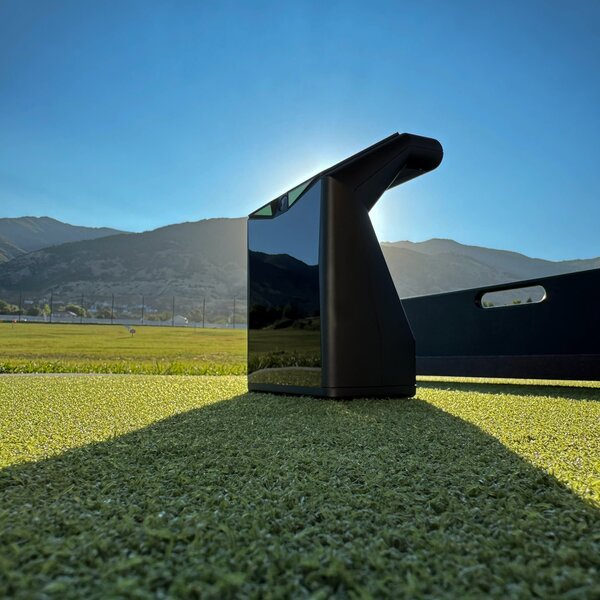
It also works outdoors. Unlike most camera-based launch monitors (which get blinded by direct sunlight), the LaunchBox’s infrared sensors handle outdoor use. You can use it on synthetic turf at the range or in the backyard. The E Ink display is readable in full sun. This indoor-outdoor versatility is rare in camera-based devices.
Who Is This For?
The no-subscription buyer. You want to spend $2,999 and never write another check. The 27 included courses are yours forever. No annual fees, no renewal reminders, no software going dark if you skip a payment. This is increasingly rare in the simulator market and it’s the LaunchBox’s strongest argument.
The club-data-focused practice golfer. You care about face angle and club path and attack angle. You don’t want to deal with stickers. The LaunchBox gives you this data without any setup friction. You just hit balls and the numbers appear.
The E6 loyalist. If you love E6 — you prefer its graphics, you like its course selection, you have friends on E6, you prefer the iPad-based setup — then the LaunchBox is your best option at this price. The included 27 courses and the upgrade path to APEX make it the most cost-effective way into the E6 ecosystem.
The short game practicer. If you spend significant practice time on chips and partial wedges, the LaunchBox handles those shots better than anything else at this price. The ST MAX and BLP both have short-game blind spots. The LaunchBox reads chips reliably.
Who Should Skip It
Skip it if you want GSPro. This is the dealbreaker for most informed buyers. GSPro is the best sim software available. If you want access to 1,500+ courses, the GSPro community, the mod scene, or the most active development schedule in sim software, the LaunchBox cannot give you that.
Skip it if you’re comparing it to the Square Golf Omni. The Omni at $1,600 is $1,399 less, has four cameras (the LaunchBox has two), supports GSPro natively, and has no subscription. The Omni doesn’t measure club data without stickers, which is the LaunchBox’s advantage. But unless you specifically need stickerless club data, the Omni is the better value at this tier. See our full head-to-head comparison →
Skip it if you want putting as part of your practice routine. Putting on the LaunchBox is basic. If you want a device that tracks putting stroke and green reads, you need to look at higher-end options or a dedicated putting setup.
Use marked balls for best results. See our best golf balls for simulator guide →
How It Stacks Up
vs Square Golf Omni ($1,600): The Omni is cheaper, has more cameras (4 vs 2), supports GSPro, and costs $1,399 less. The LaunchBox wins on stickerless club data. If club data matters more than $1,400, get the LaunchBox. If budget and GSPro access matter more, get the Omni.
vs SkyTrak ST MAX ($1,995 + $250/yr): The ST MAX has a camera-radar hybrid system, supports GSPro (with the $250/yr Play & Improve plan), and costs less upfront. But the subscription model means you’re paying $1,995 + $250/yr ongoing. Over 5 years: ST MAX = $3,245. LaunchBox = $2,999. The LaunchBox is cheaper over time and gives you club data without stickers that the ST MAX cannot. But the ST MAX has GSPro and the ST MAX has more data depth. Tradeoffs. Full head-to-head →
vs Bushnell Launch Pro ($2,499 + $249/yr): The BLP has Foresight’s camera technology, excellent accuracy, and GSPro support. But it also has a subscription ($249/yr) and requires marked balls for spin measurement. Over 5 years: BLP = $3,744. LaunchBox = $2,999. The LaunchBox saves $745 over 5 years and gives you stickerless club data that the BLP’s base tier cannot. The BLP wins on accuracy ceiling and software flexibility.
vs TruGolf LaunchBox — That’s You. By the Numbers:
| Spec | LaunchBox | Square Omni | SkyTrak ST MAX | BLP |
|---|---|---|---|---|
| Price | $2,999 | $1,600 | $1,995 | $2,499 |
| 5-Year Cost | $2,999 | $1,600 | $3,245 | $3,744 |
| Club Data | Yes (no stickers) | No (stickers needed) | No (stickers needed) | No (stickers needed) |
| GSPro | No | Yes | Yes | Yes |
| Courses Included | 27 (owned) | 1,000 credits | None | None |
| Battery | 4-6 hrs | 6 hrs | No (plugged) | No (plugged) |
The Stickerless Club Data Advantage
The TruGolf LaunchBox is the best E6 ecosystem device you can buy, and the stickerless club data at $2,999 is a genuine innovation that nobody else at this price point offers. The dual cameras, the E Ink display, the 27 owned courses, the no-subscription model, the indoor-outdoor versatility — it’s a well-designed product from a company that understands camera-based tracking.
But the E6 lock-in is real. GSPro is the standard for informed sim buyers, and the LaunchBox doesn’t support it. If you’ve never tried GSPro you won’t miss it — E6 is a solid platform. But if you know what GSPro offers, the LaunchBox’s limitation becomes the deciding factor.
My honest recommendation: if you want the simplest, most complete sim experience with real club data and zero ongoing costs, the LaunchBox is the best option in the $3,000 range. If GSPro matters to you, buy the Square Omni for $1,600 and put the remaining $1,399 toward a GSPro subscription for the next five years.
See where it ranks: Best Launch Monitors 2026 → — the full roundup including the $2-3K bracket.
Compare the LaunchBox: vs SkyTrak ST MAX — $2,999 no-sub E6 vs $1,995 GSPro hybrid
Need no-subscription options? Best No-Subscription Launch Monitors → — every launch monitor with zero annual fees compared.
Head-to-Head Comparisons
Want to see how the TruGolf LaunchBox stacks up against the competition?