Square Golf Omni
The Square Golf Omni is a $1,599 four-camera launch monitor with built-in display, indoor/outdoor use, GSPro/E6 compatibility, and zero subscription fees.
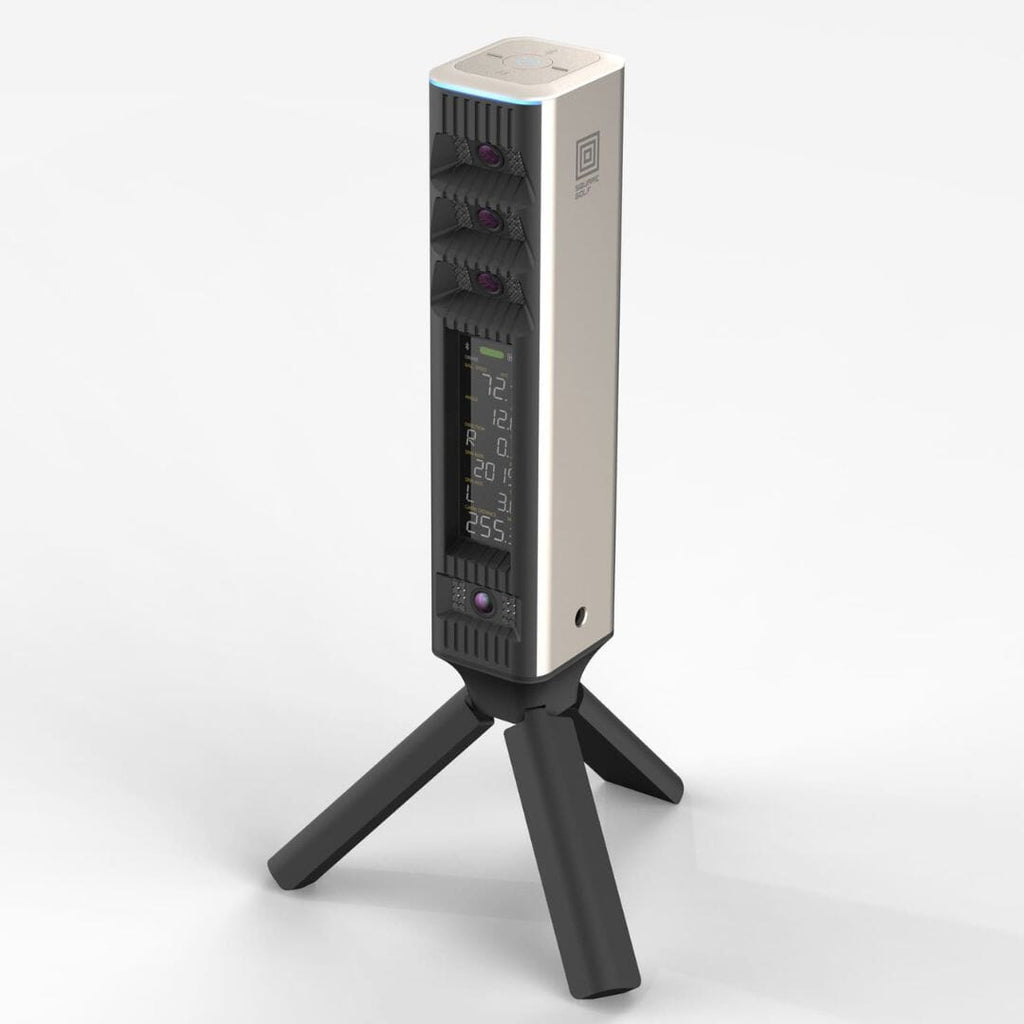
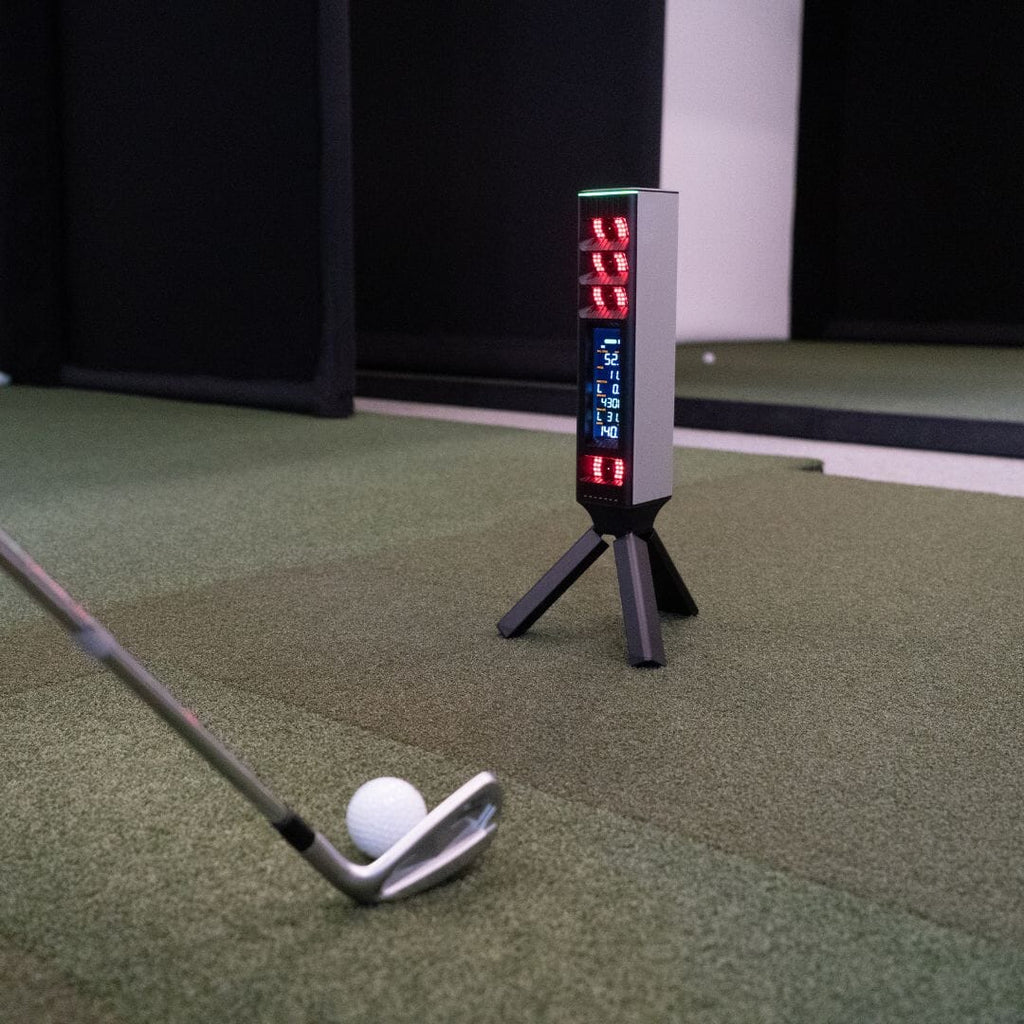
The Square Golf Omni is the most disruptive launch monitor of 2026. Four cameras, 17 metrics, indoor and outdoor use, built-in display, and zero subscription — at $1,599. That's a product that genuinely didn't exist before. And now we have independent confirmation from PlayBetter, National Club Golfer, and Practical Golf that the accuracy is legit — carry within 2 yards of GC3, spin rates nearly identical to Trackman. It's not perfect: club data requires stickers, flop shots can confuse the cameras, and it's first-gen hardware from a company with a shorter track record than Foresight or Bushnell. But for anyone building a home sim, or anyone who's done with subscription models, the Omni is the best value in camera-based launch monitors right now.
Square Golf Square Golf Omni · $1,599
What We Love
- +Four high-speed cameras at this price — no other photometric unit under $2K can match this
- +Zero subscription fees. All 17 metrics included. GSPro connects with no extra charge.
- +Works indoors AND outdoors on real grass — the only sub-$2K camera unit that can
- +Built-in 4.3-inch LCD display — standalone use without phone or tablet
- +Replaceable battery (5-7 hours) — long-term ownership durability
- +Directly measured spin, club path, angle of attack — not estimated
- +No marked balls needed indoors
- +IP44 splash resistant for outdoor peace of mind
What Sucks
- −Stickers required for club data (shaft stickers + face stickers) — adds friction
- −Face angle and dynamic loft are estimated, not directly measured
- −Camera unit needs good lighting — dim garages need extra light
- −New product — no long-term reliability data or large community yet
- −No FSX Play support — Foresight loyalists won't find it here
- −Club stickers need replacing periodically — consumable cost
- −Flop shots and extreme open-face shots can confuse the cameras — confirmed by Jay Lasco (Golf Simulator Videos)
- −No carrying case included — you're responsible for protecting it
Watch It in Action
UPDATE — July 4, 2026: Square Golf has restructured its product lineup. The Omni was delisted from PlayBetter, and Square Golf launched a new $699 model. The Omni remains available through other channels. See our full breakdown of the product changes →
Square Golf made the Home Edition — a $699 two-camera photometric unit that punched way above its weight. No subscription. No marked balls. Just solid entry-level launch monitor data at a price that made the Garmin R10 look expensive.
That was the opening act.
The Square Golf Omni is the headliner. It has four cameras, a built-in LCD display, indoor and outdoor use, full club data, seventeen metrics, a replaceable battery, and IP44 splash resistance — with no subscription, ever — for $1,599.
A multi-camera photometric launch monitor with directly measured spin, club path, angle of attack, impact location, and GSPro compatibility — with no paywalls, no tiers, no annual fees — for $1,599. That’s not just a good deal. That’s a product category that didn’t exist six months ago.
What Is the Square Golf Omni?
It’s the premium flagship of Square Golf’s launch monitor lineup, announced at the 2026 PGA Show and shipping now. Think of it as the Home Edition grown up — same no-subscription philosophy, but everything turned to eleven.
Where the Home Edition had two cameras, the Omni has four. Where the Home Edition was indoor-only, the Omni works on real grass in direct sunlight. Where the Home Edition had no club data, the Omni tracks club path, angle of attack, club speed, and impact location. Where the Home Edition had no built-in screen, the Omni has a 4.3-inch LCD that shows your six core ball metrics without connecting to anything.
It’s a fundamentally different product at a fundamentally different price point. And I mean that literally — there’s nothing else on the market at $1,599 doing what the Omni does.
| Spec | Square Golf Omni | SkyTrak+ | Bushnell LPi | FlightScope Mevo+ |
|---|---|---|---|---|
| Price | $1,599 | $1,995 | $1,499 | $1,099 (closeout) |
| Technology | 4-camera photometric | 2-camera photometric | 3-camera triscopic | Doppler radar |
| Subscription | $0 ever | $99-$499/yr | $199-$499/yr | $0 (E6 courses included) |
| Indoor/Outdoor | Both | Indoor + turf | Indoor only | Both (needs 16ft) |
| Built-in display | Yes 4.3“ LCD | No | No | No |
| Club data | Yes (stickers) | No | Yes (stickers, $199/yr) | Yes (estimated) |
| Spin measurement | Direct (cameras) | Estimated | Direct (cameras) | Estimated (radar) |
| No marked balls | Yes | Yes | Yes | Yes |
| Battery | Yes Replaceable (5-7hr) | No (plugged) | No (LPi plugged) | Yes (1.5hr) |
| GSPro access | Yes Free | Yes (via sub) | Yes (via $199/yr) | Yes (via connector) |
| Min room depth | ~12 ft | ~12 ft | ~12 ft | 16-18 ft |
That comparison table tells the story. The Omni is cheaper than the SkyTrak+, works outdoors when the SkyTrak+ doesn’t, has a display neither the SkyTrak+ nor LPi have, doesn’t require a subscription like both competitors do, and gives you more cameras than either of them.
The Four-Camera Difference
The camera count matters for a specific reason.
Most budget launch monitors — and I’m including the $1,000-2,000 range here — use two cameras. Two cameras can track ball flight. They can measure launch angle and ball speed. They can estimate spin based on how the ball moves through the air.
But directly measuring spin — watching the ball rotate between frames — requires multiple angles of view. More cameras = better spin axis measurement, better club path tracking, better impact location data.
The Omni has four high-speed infrared cameras arranged vertically along the front of the unit, paired with infrared illuminators. This is the same multi-camera philosophy as the Foresight GC3 ($6,000) and Uneekor Eye Mini ($2,999). The difference? Those cost two to four times as much and still require subscriptions to unlock full features.
The 17 metrics break down like this:
- Ball data: Ball speed, launch angle, launch direction, spin rate, spin axis, carry distance, total distance, smash factor, apex height, descent angle, hang time
- Club data (with stickers): Club speed, club path, angle of attack, impact point (horizontal + vertical), face angle (estimated), dynamic loft (estimated)
Yes, face angle and dynamic loft are estimated rather than directly measured. That’s honest of Square to disclose. Most units in this price range don’t tell you which numbers are guesses. Square does. That builds trust, even when it’s pointing to a limitation.
Real-World Accuracy: What the Independent Reviews Say
When I wrote the first version of this review, the Omni was still a preorder. The specs looked incredible on paper, but I said the same thing I say about every first-gen product: wait for independent testing.
Well, the units shipped — though the rollout was bumpier than anyone expected. Here’s the full shipping timeline → And the testing is in.
PlayBetter’s Marc Sheforgen ran the Omni against both an Uneekor Eye XO and a Foresight GC3 across three different testing environments — indoors on mats, outdoors on grass, with every club in the bag. The results are honestly remarkable:
“Across three different testing environments and with each type of club in the bag, the Omni delivered ball and club data that consistently matched what I’d expect from a launch monitor costing several times more.”
Against the Eye XO (a $6,000+ overhead unit), the Omni produced carry distances within two yards of each other. Ball speeds within a single mile per hour. Spin rates within 200 RPM. Launch angles within a couple of degrees. Against the GC3, the story was the same: “generally within a couple yards, a couple degrees, a couple miles per hour.”
Sheforgen’s conclusion: “yes, I think it’s absolutely the real deal.”
National Club Golfer tested the Omni against a Trackman 4 and found “spin rates were almost identical each shot to the Trackman.” Carry distances had a 5-yard variation at most, and usually within a couple. That’s Trackman-level accuracy at one-twentieth the price.
Jon Sherman of Practical Golf — who tests launch monitors professionally for The Indoor Golf Shop — put it even more directly:
“In my testing, the Omni was almost identical to my Foresight GC3 on many shots. The original Square was accurate when it worked, but you would get misreads at times. The newer one, because it has extra cameras, I don’t think I got one misread, except maybe on the driver a couple of times. But it was pretty spot on.”
Multiple zero-misread sessions. Against a GC3. That’s not a preorder promise anymore. That’s published data.
Golf Simulator Videos’ Jay Lasco found one genuine limitation: flop shots. When you lay the club completely flat and slide under the ball, the Omni can get confused — reporting launch angles that don’t match reality. He calls it “one thing they need to dial in.” This is a real finding, though it only affects a very specific shot type that most sim users will rarely hit.
The overall picture is clear: the Omni’s four-camera array delivers accuracy that rivals units costing two to four times as much. The spec sheet wasn’t marketing. It was the truth.
Why the 5/10 Split? Breaking Eighty’s Take vs. Ours
You might have seen that Breaking Eighty rated the Square Golf Omni 5 out of 10 in early July. We rate it 8.5 out of 10. That is not a small gap. And it is worth explaining why.
Breaking Eighty tests launch monitors against a $5,000+ benchmark. Their review methodology compares every unit to the Foresight GC3 as the baseline — which is fair for a professional testing site. Under that lens, the Omni has real limitations: sticker-based club data, flop shot blind spots, first-gen firmware quirks, and a smaller hitting zone than premium units. Compared to a $5,249 GC3, the Omni is missing things. That is true.
Our review uses a different framework. We evaluate launch monitors against their price tier and their intended buyer. At $1,599, the Omni is competing against the SkyTrak+ ($1,995), the Bushnell Launch Pro ($1,499 + $199/yr subscription), and the Square Golf HE ($699). Against those competitors, the Omni is the best value in camera-based launch monitors at this price — more cameras, better accuracy, lower total cost of ownership.
Both frameworks are valid. Breaking Eighty’s question is “how does this compare to the best?” Our question is “what is the best launch monitor for the money?” Those are different questions, and they produce different answers.
Who should trust the 5/10: If you already own a GC3 or are shopping in the $5,000+ bracket, the Omni will feel like a downgrade. The sticker requirement, camera limitations on extreme shots, and narrower hitting zone are real compromises. Breaking Eighty’s rating makes sense for a buyer who can afford premium hardware.
Who should trust the 8.5/10: If you are building a home sim on a $2,000 budget, want camera accuracy, and do not want subscription fees, the Omni is the best option. Period. No other product at this price gives you four cameras, measured spin, GSPro compatibility, and zero recurring costs.
The underlying data is the same from both reviews. Both agree the Omni delivers excellent accuracy for its price point. The divergence is entirely about expectations and comparison sets. Read both, understand the framework, and decide which one fits your situation.
Built-In Display: The Feature You Didn’t Know You Needed
The Omni has a 4.3-inch LCD screen that shows ball speed, launch angle, launch direction, spin rate, spin axis, and carry distance after every shot. No phone. No tablet. No app. Just look down, see your numbers, hit another.
This sounds minor until you’ve used a launch monitor that requires a phone. You know what happens? You pull out your phone, it’s not connected, you fumble with Bluetooth, you miss the rhythm of your practice session. The phone becomes the bottleneck between you and hitting balls.
The Omni removes that bottleneck entirely. The screen is there, it’s bright enough for outdoor use, and it shows the six numbers that matter most at a glance. If you want the full 17-metric breakdown, the phone app is there for deeper sessions. But for casual range work or quick sim sessions, you never need to open it.
The No-Subscription Math
| Device | Upfront | Year 1 | Year 3 | Year 5 |
|---|---|---|---|---|
| Square Golf Omni | $1,599 | $1,599 | $1,599 | $1,599 |
| SkyTrak+ ($99/yr Essential) | $1,995 | $2,094 | $2,292 | $2,490 |
| SkyTrak+ ($299/yr Core TM) | $1,995 | $2,294 | $2,892 | $3,490 |
| Bushnell LPi ($199/yr Silver) | $1,499 | $1,698 | $2,096 | $2,494 |
| Bushnell LPi ($499/yr Gold) | $1,499 | $1,998 | $2,996 | $3,994 |
The Omni is $100 more than the Bushnell LPi upfront. After one year of Silver subscription, the LPi has cost you more. After five years, the Omni saves you nearly $900 compared to the cheapest SkyTrak+ tier and over $2,300 compared to the Gold-tier Bushnell LPi.
That’s not even counting the GSPro savings. The Omni connects to GSPro with no extra fee. The SkyTrak+ needs at minimum the Essential tier ($99/yr) for GSPro access. The Bushnell LPi needs Silver ($199/yr). Over five years, that’s $495 to $995 in GSPro access costs that the Omni simply doesn’t charge.
The math is straightforward. If you plan to own this device for more than a year, and you plan to use GSPro, the Omni is cheaper. Significantly cheaper.
Indoor vs Outdoor: The Real Differentiator
Most camera-based launch monitors are indoor specialists. Take them outside and the sunlight washes out the cameras. The SkyTrak+ is indoor-only or turf-only. The Bushnell LPi is explicitly marketed as indoor-only.
The Omni works on real grass. In direct sunlight. With a replaceable battery that lasts 5-7 hours.
This is a genuinely rare capability at any price under $5,000. The only other sub-$2K unit that works outdoors on grass is the Square Golf Home Edition — and that doesn’t have club data or a built-in display.
If you want one device that lives in your garage sim during the week and goes to the range on Saturday, the Omni is basically your only choice under $2,000.
Club Data: The Sticker Situation
The Omni requires stickers for club data. Two stickers per club — one shaft sticker above the hosel, one face sticker at the top center of the face. You get 20 sets in the box. That’s enough for a full bag plus spares.
The shaft sticker enables direct measurement of club path and angle of attack. The face sticker enables impact location mapping and club speed. Face angle and dynamic loft are estimated from those inputs.
Is the sticker requirement annoying? Yes. It’s extra friction. I won’t pretend otherwise.
Is it a dealbreaker? Not if you’re the kind of person who sets up their launch monitor once and then hits 500 balls. You put the stickers on, they last a few sessions, you replace them. It takes 30 seconds per club.
Compare this to the alternatives. The SkyTrak+ has no club data at all without an expensive add-on. The Bushnell LPi has stickers and a $199/yr subscription. The Garmin R10 estimates club data from radar (less accurate but no stickers). The Omni’s approach — stickers for measured club data, no subscription — is the middle path that makes sense for most buyers.
Software and Simulator Support
| Software | Square Golf Omni |
|---|---|
| GSPro | Yes Free, no extra fee |
| E6 Connect | Yes Compatible |
| Awesome Golf | Yes Compatible |
| Square Golf native | Yes 1,000 free credits (27 courses + 12 rotating) |
| FSX Play | No |
| TGC 2019 | No |
Not every launch monitor connects this cleanly to GSPro. Some need community connectors. Some don’t work at all. See our full GSPro compatibility guide → for the complete table with 27 launch monitors and setup instructions for each tier.
The GSPro integration is seamless — the Omni connects directly with no middleman subscription. This is the killer app. GSPro is the best sim software on the market, costs $250/year, and the Omni connects to it without charging you anything extra for the privilege. That’s not true of the SkyTrak+ (requires at least $99/yr) or Bushnell LPi (requires $199/yr).
Need a PC for GSPro? The Omni works either way — use Awesome Golf on iPad with no PC at all, or connect to GSPro on a Windows machine. Our Square Golf + Awesome Golf gaming PC guide →
The native Square Golf software comes with 1,000 course credits — roughly 55 rounds of play. When those run out, you can buy more or just use GSPro full time. The native software is good enough for casual play, but GSPro is the destination for dedicated sim users.
Square Software V2.0.0: The Lodge Range and Green Slopes
Square rolled out a major software update recently, and it addresses some of the biggest criticisms of the native experience. Version 2.0.0 adds the Lodge driving range with day/night mode, 21 data points (up from 14), customizable data views, and — most importantly — putting with green slope settings. You can set the putting surface to Flat, Typical, or Tough, which changes the break on simulated putts. That’s a meaningful difference from the original software, where putting felt flat and unrewarding.
The carry distance adjustment and improved data views make the native software more usable for daily practice, even if GSPro remains the destination for serious sim play.
Firmware 1.4: Continued Improvement
Square has also been iterating on the Omni’s firmware. The 1.4 release improved camera tracking consistency, particularly for driver and woods at higher club speeds. Golf Simulator Videos’ Jay Lasco reviewed the 1.4 update and confirmed the flop shot blind spot I mentioned earlier is still present, but tracking reliability across normal shots is better than at launch. This is a good sign — Square is actively improving the product rather than shipping and forgetting.
Build Quality and Portability
The Omni is lighter than every competitor except the Garmin R10. It’s 2 pounds on a folding tripod. The aluminum base and robust plastic top feel solid without being heavy. The IP44 splash resistance means you don’t panic if a sprinkle hits it on the range.
The replaceable battery is the underrated feature here. A 5,000mAh lithium-ion pack slides into the bottom, good for 5-7 hours of continuous use. When it eventually degrades — and all lithium batteries do — you replace the battery, not the unit. That’s the kind of design decision that saves you from buying a whole new launch monitor in 3 years.
The case situation is a minor complaint. No carry case included. The Omni is portable but you’re responsible for protecting it. Toss it in your golf bag with a towel wrapped around it and you’ll be fine.
Who Is This For?
The Square Golf Omni is the single best camera-based launch monitor value on the market if you fit any of these profiles:
The garage sim builder who wants GSPro without subscription creep. Four cameras, directly measured spin, club data, GSPro compatibility. No annual fees. You pay $1,599 once and it’s done.
The dual-use golfer who wants one device for sim AND range. No other sub-$2K camera unit does outdoor grass. None.
The subscription-fatigued buyer who’s done paying yearly for hardware they already own. The Omni respects that you already paid for the device. It doesn’t ask for more.
The SkyTrak+ fence-sitter who’s waiting for a better alternative. This is it. More cameras, lower price, no subscription, outdoor capable, built-in display. The only thing the SkyTrak+ has over the Omni is a longer track record.
Who Shouldn’t Buy It
The Foresight ecosystem loyalist. If you want FSX Play and the Foresight optical system, get the Bushnell Launch Pro or GC3. See our full Omni vs GC3 comparison for the head-to-head breakdown. The Omni doesn’t do FSX Play.
The sticker-hater. Club data requires stickers. If that’s a dealbreaker, the Garmin R10 or Mevo Gen2 (radar) are your alternatives — but they estimate club data rather than directly measuring it.
The flop shot enthusiast. I know this is niche, but if you spend your range sessions hitting high-lofted, laid-open wedge shots, the Omni’s cameras can get confused. Jay Lasco’s testing confirmed this. It’s a software limitation Square can fix, but right now, that shot type is the Omni’s blind spot.
The first-gen avoider. It’s a new product from a company that’s been making consumer golf tech for a few years, not decades. The good news: independent reviews from PlayBetter, National Club Golfer, and Practical Golf have all confirmed the accuracy is legit — carry within 2 yards of GC3, spin rates nearly identical to Trackman. The bad news: long-term reliability data still doesn’t exist. If you need the peace of mind of a proven platform with thousands of community-validated reviews, the SkyTrak+ or Bushnell LPi are safer bets.
Availability Note: Product Line Restructure (July 2026)
Square Golf quietly restructured its product line in early July 2026. The Omni was delisted from PlayBetter — at the time of writing, PlayBetter no longer carries the Omni as a standalone product. Meanwhile, Square Golf launched a new $699 model alongside the existing Home Edition and Omni.
The Omni remains available through other channels (check Square Golf’s own site and smaller retailers). But the PlayBetter delisting means the most visible retail source is no longer an option, which matters for availability and pricing.
Does this change the product itself? No. The Omni is still the best multi-camera value in launch monitors. But the distribution picture has shifted. Full breakdown of the product changes →
The Verdict
The Square Golf Omni was the most talked-about product at the 2026 PGA Show — the year the simulator category stopped being a sideshow. And now the independent testing is in, confirming the spec sheet was telling the truth.
PlayBetter tested it against a GC3 and Eye XO — carry within 2 yards, ball speed within 1 mph, spin within 200 RPM. National Club Golfer matched it against a Trackman — “almost identical” spin rates. Jon Sherman (Practical Golf) ran it through a multi-session test and got zero misreads against his GC3. The accuracy is legit.
It’s not perfect. Club stickers are a friction point. Flop shots can confuse the cameras. It’s first-gen hardware from a relatively young company. But the core product — four-camera photometric tracking with full data and no recurring fees — is executed well enough that the tradeoffs feel like compromises, not dealbreakers.
If you’re building a home sim in 2026 and you want the most camera-based launch monitor your money can buy, this is it.
Check Square Golf Omni pricing → · Omni vs BLP comparison → · Omni vs SkyTrak+ comparison → · Omni vs Eye Mini Core comparison → · Omni vs LaunchBox comparison → · Omni vs Home Edition comparison → · Expert roundup → · How Square Golf disrupted cameras → · Full launch monitor roundup → · No-subscription guide → · Best camera launch monitors 2026 →
Use marked balls for best results. See our best golf balls for simulator guide →
FAQ
What’s the real-world accuracy like now that there are independent reviews? Confirmed. PlayBetter tested it against a GC3 and Eye XO — carry within 2 yards, ball speed within 1 mph, spin within 200 RPM. National Club Golfer found spin rates “almost identical” to Trackman. Jon Sherman (Practical Golf) got zero misreads across multiple sessions against his GC3. The accuracy matches the spec sheet claims.
Does the Square Golf Omni work with GSPro? Yes. The Omni connects to GSPro directly with no additional subscription or fee. You just need a GSPro license ($250/year) and a Windows PC that can run it (gaming PC requirements).
Is there a subscription for the Omni? No. All 17 data metrics are included in the $1,599 purchase price. The 1,000 course credits for Square’s native software are a one-time allocation. Third-party software (GSPro, E6) require their own licenses but the Omni charges nothing extra for compatibility.
Does the Omni require marked balls indoors? No. The four cameras read unmarked balls. Avoid heavily marked range balls or balls with unusual dot patterns.
Can you use the Omni outdoors on real grass? Yes. That’s one of its headline features. Four-camera photometric tracking works in direct sunlight on real grass. IP44 splash resistant means light rain won’t kill it.
How does the Omni compare to the Square Golf Home Edition? The Omni is a major upgrade: four cameras (vs two), outdoor capability (vs indoor-only), built-in LCD display (vs none), replaceable battery (vs internal), full club data (vs none), IP44 splash resistance (vs indoor only). It costs $900 more but delivers a fundamentally different product.
Do you need stickers for club data? Yes. Two stickers per club — one shaft sticker, one face sticker. They enable direct measurement of club path, angle of attack, club speed, and impact location. Face angle and dynamic loft are estimated from those data points. Without stickers, you get ball data only.
What’s the room space requirement? The Omni needs about 14 inches of side offset and 6-8 feet of ball-to-screen distance indoors. Total room depth minimum is about 12 feet — roughly the same as the SkyTrak+ and Bushnell LPi. Ceiling height is standard 8 feet.
Can you putt with the Omni? Yes. It reads putts from 35-foot lags to tap-ins. Horizontal launch angle data is precise enough to predict makes and misses. The Omni switches between shot and putt mode with a button press on the unit.
Need the right balls for the Square Golf Omni? → Check our Best Golf Balls for Simulator guide (your camera unit works with any premium ball)
Head-to-Head Comparisons
Want to see how the Square Golf Omni stacks up against the competition?