Blue Tees Rainmaker
The Rainmaker's hardware is excellent for $599 — built-in display, GSPro compatibility, 21 metrics. The catch: the app still isn't ready a week after launch.
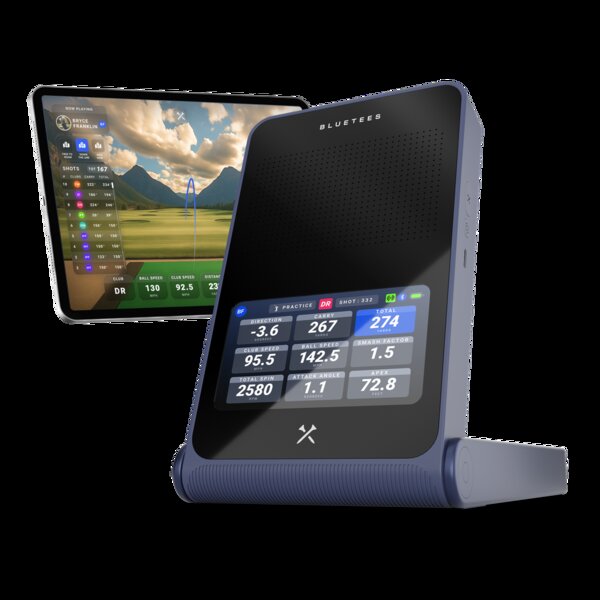
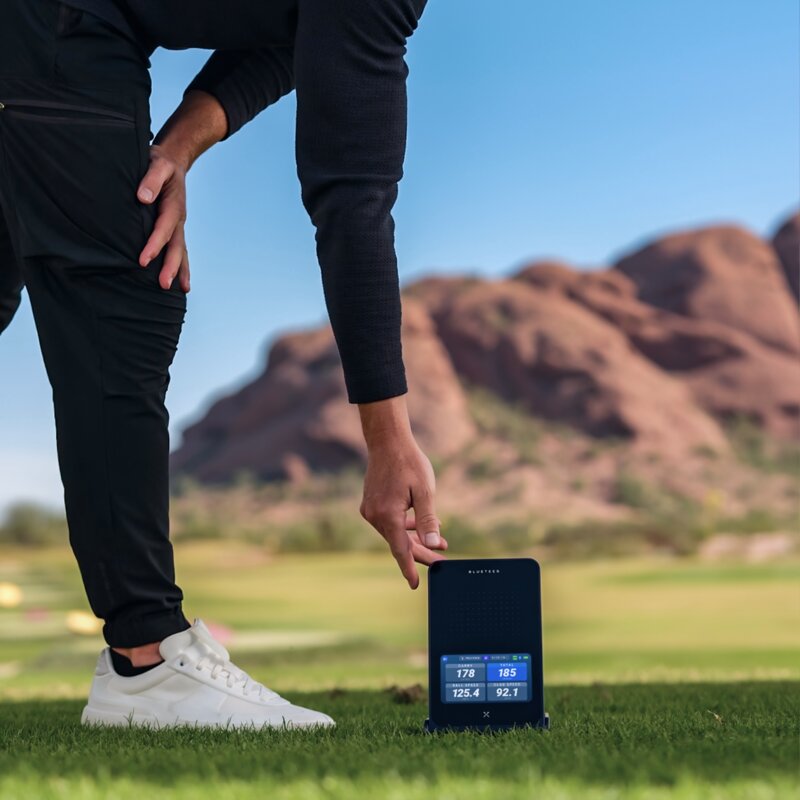
The Blue Tees Rainmaker shipping now is a hardware promise with incomplete software. The built-in display is a genuine differentiator at $599. GSPro works. The battery is strong. But the phone app is still iPad-only a week past the promised July window. E6 isn't live. RCT ball support isn't live. Club selection is limited. If you want a $599 radar launch monitor built around a fantastic display and you're happy to wait for the software to catch up — buy it. If you want something that works completely today, the Garmin R10 at $499 has a mature app, years of community support, and costs $100 less.
Blue Tees Blue Tees Rainmaker · $599
What We Love
- +Built-in 4.3-inch TFT display — standalone use without a phone or tablet
- +GSPro compatibility is live (public beta) — works for course play
- +7-hour battery life — real-world all-day range sessions
- +IPX4 water resistant — light rain won't kill your session
- +1,000-shot onboard storage — review your session data later
- +Now shipping — units available at PlayBetter, Rain or Shine, ships same/next day
What Sucks
- −Phone app is STILL not ready — iPad-only as of mid-July, iPhone/Android timeline unclear
- −Short game is mostly a no-read zone — chips, pitches, and partial wedges are unreliable
- −Club selection options are limited — fewer choices than R10 or SC4 Pro
- −E6 Connect is 'coming soon' — GSPro is the only sim option that actually works today
- −RCT ball integration is NOT live — no marked ball support yet, Blue Tees 'in testing with Titleist'
- −Attack angle and total distance 'run high' per PlayBetter independent testing
- −First-gen launch monitor from a rangefinder company — growing pains are real
Blue Tees makes excellent rangefinders. The kind you see on every other tee box at your local course. They know distance measurement. They know golf.
Now they’re trying to make a launch monitor.
The Rainmaker is their first swing at it — a $599 Doppler radar unit with a built-in display, GSPro compatibility, and enough on-paper specs to make the Garmin R10 look like yesterday’s news. But launching a launch monitor is harder than launching a rangefinder. You’re not just measuring distance to a pin. You’re tracking spin at 12,000 RPM, club path at 115 mph, launch angle within tenths of a degree. That’s a different engineering challenge.
The Rainmaker’s hardware is impressive for a first attempt. The software? That’s where things get complicated. And the phone app — which is central to the full experience — still isn’t available on iPhone or Android as of mid-July.
Here’s what you need to know before you buy.
What the Rainmaker Actually Is
The Rainmaker is a Doppler radar launch monitor that sits behind you (about 7-8 feet back) and tracks the ball through its flight. Same technology as the Garmin R10 and Voice Caddie SC4 Pro. Same strengths (works indoors and outdoors, no marked balls needed). Same weaknesses (needs flight space, struggles with short game, estimates spin rather than measuring it).
But Blue Tees added two things the competitors don’t have:
A built-in 4.3-inch TFT display. You turn it on, hit a ball, and your six core metrics show up on the screen. No phone. No tablet. No pairing. No app. Just you, the unit, and your numbers.
Onboard storage for 1,000 shots. You can hit 300 balls on the range, take the unit home, and review every data point from your session. The R10 and SC4 Pro require a connected device for storage. The Rainmaker remembers.
Those two features are the entire value proposition. If those matter to you, the Rainmaker is the only game at this price. If they don’t — and most people will pair their phone regardless — you’re paying $100+ more for features you won’t use.
The Spec Sheet
| Spec | Blue Tees Rainmaker |
|---|---|
| Price | $599 |
| Technology | Doppler radar |
| Display | 4.3“ TFT (standalone use) |
| Metrics | 21 (ball speed, club speed, spin rate, launch angle, carry, smash factor, descent angle, hang time) |
| GSPro | Yes (public beta, live) |
| E6 Connect | Claimed compatible, not confirmed working by independent testers |
| Phone app | iPad-only (iPhone/Android not yet available as of mid-July) |
| Shipping | Now shipping — PlayBetter same-day, Rain or Shine next business day |
| Battery | 7 hours |
| Water resistance | IPX4 |
| Onboard storage | 1,000 shots |
| Subscription | 1yr free GAME AI+ included |
| Weight | ~1.5 lbs |
| Room depth needed | ~16-18 feet (radar standard) |
Now compare that to the Garmin R10 — which has a mature app, years of community support, working GSPro and E6 integration, and an established track record. The R10 just dropped to $499 on Garmin.com (July 2026), making it $100 less than the Rainmaker. Garmin R10 units are also available at $408 with full 1-year warranty. The Rainmaker costs $100 more for a built-in screen and not much else that actually works today.
Where the Rainmaker Delivers
The Built-In Display
This is the headline feature, and it’s legitimately useful. You set the Rainmaker up, turn it on, start hitting. Each shot shows ball speed, launch angle, carry distance, spin rate, club speed, and smash factor on the unit’s screen. You don’t touch your phone until you want to dig deeper.
For range sessions, this is actually better than a phone. No notifications popping up. No battery anxiety. No fumbling with the app between shots. You just look down, see your number, grab another ball.
It’s the same philosophy as the TruGolf LaunchBox’s E Ink display, just at one-third the price.
GSPro Works (Public Beta)
The most important question for any budget launch monitor: does it work with GSPro? The answer is yes, for the Rainmaker. GSPro compatibility is live via public beta. It works. You can play courses with it.
Is it as seamless as a $6,000 GC3? No. It’s a $600 radar unit. But it connects, it tracks your shots, and you’re playing simulated golf. That’s the whole experience right there.
Battery Life
Seven hours is real. The R10 gets about 10 hours (no display). The SC4 Pro gets about 5 hours (with display). The Rainmaker splits the difference with a display and gets 7 hours — enough for two full range sessions or a long day at the sim.
Onboard Storage
This is a nice-to-have that becomes a real feature once you start using it. Hit a bucket of balls, review the data later. No phone required during the session. If you’re the data-obsessed type who wants to analyze every session, this is genuinely useful.
Where the Rainmaker Falls Short
The Phone App Still Isn’t Here — Full timeline of delays →
This is the big one. The Blue Tees LAUNCH app is iPad-only right now. No iPhone app. No Android app. Blue Tees said “phone available beginning of July” in their help documentation. July 8 is here. Still no phone app.
The company’s help center now says “iPhone and Android phone support is expected in July 2026” — future tense. The App Store listing confirms iPad-only compatibility. There is no Android version in the Play Store.
That means if you don’t have an iPad, you can’t use the app at all. Period. You can use the built-in display to see your six core metrics, and you can use the GSPro beta for course play. But the app — where you review session data, customize settings, update firmware, unlock advanced analytics — is locked behind a device you might not own.
Per Marc Sheforgen’s complete review at PlayBetter (June 2026): “The launch felt a bit rushed. The app wasn’t ready when the product began shipping. The phone app still isn’t ready as of this writing.”
One month later, the phone app still isn’t ready. That’s not a rushed launch anymore. That’s a pattern.
Short Game Is a No-Read Zone
This is a radar limitation, not a Rainmaker-specific issue, but it’s worth calling out. Chips, pitches, partial wedges — the Rainmaker struggles. The ball doesn’t travel far enough through the radar beam for accurate measurement. You’ll get inconsistent readings or no readings at all.
The R10 has the same problem. The SC4 Pro has the same problem. If you care about short game practice, budget radar is not your friend. You need a camera-based system for that. But the Rainmaker’s short game performance is on the worse end of the spectrum based on early testing.
Club Selection Is Limited
The Rainmaker’s club selection options are fewer than what the R10 and SC4 Pro offer. You choose from a basic list without the fine-grained options competitors provide. For most practice sessions, this doesn’t matter — you know what club you’re hitting. But for detailed session analysis where the app tracks your club-by-club performance, it’s a meaningful gap.
Attack Angle and Total Distance “Run High”
PlayBetter’s testing found that attack angle and total distance numbers tend to read high compared to reference units. Ball speed and carry were within range for the price. But if you’re relying on attack angle numbers to dial in your swing, take them with a grain of salt. And total distance — which already varies wildly based on roll-out conditions — is even less reliable here.
E6 Connect: Marketing Claim vs Reality
Blue Tees’ product page and help center say the Rainmaker is “compatible with E6.” The help page says “Additional setup and compatibility information will continue to be shared as simulator integrations evolve.” That’s not the confident language of a live integration.
PlayBetter’s hands-on review states explicitly: “E6 Connect integration isn’t available yet but supposedly coming soon.” Multiple other first-look reviews say the same thing.
GSPro is your only simulator option that actually works today. If you’re an E6 user, you’re waiting — and no one can tell you how long.
RCT Ball Integration Not Live
Blue Tees promised RCT (Recommended Chip Technology) ball support — marked balls that help radar units track spin more accurately indoors. It’s not live yet. PlayBetter confirmed Blue Tees says they are “in the RCT testing process with Titleist.” For indoor use, this means spin numbers will be less reliable than they could be once the feature ships. The QC test balls that come in the box help with spin, but not at the level of proper RCT support.
The Price Question
$599. That’s the number.
| Device | Price | Display | GSPro | App | Short Game | Shipping |
|---|---|---|---|---|---|---|
| Blue Tees Rainmaker | $599 | Yes (4.3“) | Beta live | iPad-only, phone late | Weak | Now shipping |
| Garmin R10 | $499 (street) | No | Yes (mature) | Full, works great | Weak | In stock everywhere |
| Garmin R10 CPO | $408 | No | Yes (mature) | Full, works great | Weak | PlayBetter |
| Voice Caddie SC4 Pro | $500 | Yes (small) | No (E6 only) | Full, works great | Weak | In stock |
The R10 costs $100 less and has a mature app, mature software ecosystem, years of community support, and every bug documented. Or you can get a certified pre-owned R10 for $408 with the same 1-year warranty as new — that’s $191 less than the Rainmaker. The Rainmaker costs more and gives you a built-in display but an unfinished software experience.
If you’re comparing by hardware specs on paper, the Rainmaker wins — more features for a slightly higher price. If you’re comparing by “what will actually work today,” the R10 wins by a wide margin.
Who Should Buy the Rainmaker
Buy it if: You want a budget radar launch monitor with a built-in display and you’re willing to wait for the software to catch up. The hardware is solid. GSPro works. The display is genuinely useful. Shipping is live at PlayBetter (same-day) and Rain or Shine (next business day). If you have an iPad, a tolerance for beta-quality software, and patience — the hardware foundation is there.
Buy it if: You’re a Blue Tees loyalist who already owns their rangefinders and wants everything in one ecosystem. The ecosystem play is real — one account, one app, one brand across your golf tech. When the app finally ships, the Scout AI integration with Captain rangefinders will be a genuine differentiator.
Don’t buy it if: You want a launch monitor that works perfectly out of the box today. The app situation is too raw. The phone app still isn’t here — club selection is limited, E6 isn’t live, RCT ball isn’t supported. This product shipped early and the company is still catching up.
Don’t buy it if: You have an Android phone. The app is iPad-only with iPhone “coming” but no confirmed date. Android isn’t even on the roadmap. If you’re on Android, the Rainmaker is not for you right now.
Don’t buy it if: You value a complete software experience today over hardware specs on paper. The Garmin R10 at $499 costs less, works better today, and has community support the Rainmaker can’t match. Or get the R10 CPO at $408 with the same 1-year warranty and save $191.
The Verdict
The Blue Tees Rainmaker is the most frustrating kind of first-gen product: the hardware is genuinely impressive and the software is holding it back by months.
The built-in display is a real differentiator. GSPro works. The battery is great. The onboard storage is useful. PlayBetter and Rain or Shine are shipping units same-day. Blue Tees showed up with legitimate hardware.
But the phone app is still not here a week after launch. E6 isn’t live. RCT ball support is in Titleist testing purgatory. Club selection is limited. Attack angle reads high. Short game is unreliable. Each of these is fixable with software updates. All of them together make the Rainmaker a beta product at full price.
The Garmin R10 costs $100 less, has a mature app, years of community feedback, and works today. The R10 CPO costs $191 less with identical warranty.
If you want the hardware bargain of the year and can wait — buy the Rainmaker. If you want to hit balls tonight, buy the Garmin R10. The Rainmaker will catch up. It’s not there yet.
Use marked balls for best results. See our best golf balls for simulator guide →
FAQ
Does the Rainmaker work with GSPro? Yes, via public beta. GSPro course play is live and functional.
Does it work with E6 Connect?
Blue Tees marketing claims compatibility, but independent hands-on testers report it is not yet available. PlayBetter’s June 2026 review states “E6 Connect integration isn’t available yet but supposedly coming soon.” GSPro is your only live simulator option.
Is there a phone app?
iPad only. The Blue Tees LAUNCH app works on iPad today. Blue Tees said “phone available beginning of July” — as of mid-July, the App Store confirms iPad-only compatibility with no iPhone version. Android has no confirmed timeline.
Do you need an iPad to use the Rainmaker? No. The built-in display shows your six core metrics. You can use GSPro for course play. But for session review, settings, and firmware updates, you need the app — and the app requires an iPad.
How does it compare to the Garmin R10? The Rainmaker has a better display and more on-paper features. The R10 has a mature app, years of community support, and costs $100 less at $499 (permanent price drop on Garmin.com). A certified pre-owned R10 is $408 with the same 1-year warranty — $191 less than the Rainmaker. Right now, the R10 is the safer buy. In 6 months, if Blue Tees ships all the promised software, this might be different. Full Rainmaker vs Garmin R10 comparison →. If you’re comparing the Rainmaker against the Rapsodo MLM2Pro — direct comparison. Then there’s the $199 Shot Scope LM1 — Rainmaker vs LM1 — $599 sim radar vs $199 practice radar, two completely different jobs.
Can you use it indoors? Yes, but you need about 16-18 feet of room depth. Same as every budget radar unit. Camera-based LMs are better for tight spaces.
Is the short game usable? Mostly no. Chips, pitches, and partial wedges are unreliable. This is a radar limitation, not a Rainmaker-specific issue, but it’s worth knowing.
Does it require a subscription? No subscription required for core features. You get 1-year free GAME AI+ subscription included. Blue Tees released a major AI update in July 2026 — the Intelligence Tier — adding Scout AI Virtual Caddie, Strokes Gained analysis, and Satellite View course visualization. Full breakdown here.
Check Blue Tees Rainmaker pricing → · Best Launch Monitors 2026 → · Camera vs Radar: Which is Better? → · Garmin R10 Review → · Rainmaker vs Square Golf → · Rainmaker vs Garmin R10 → · Rainmaker vs SC4 Pro →
Need the right balls for the Blue Tees Rainmaker? → Check our Best Golf Balls for Simulator guide (RCT recommended for indoor spin accuracy)
Head-to-Head Comparisons
Want to see how the Blue Tees Rainmaker stacks up against the competition?