Uneekor EYE XO2
The $10,999 Overhead Flagship With a 28-Inch Hitting Zone
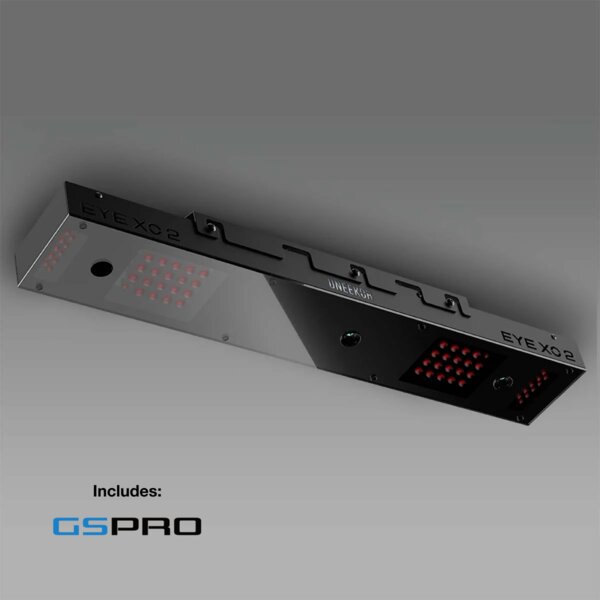
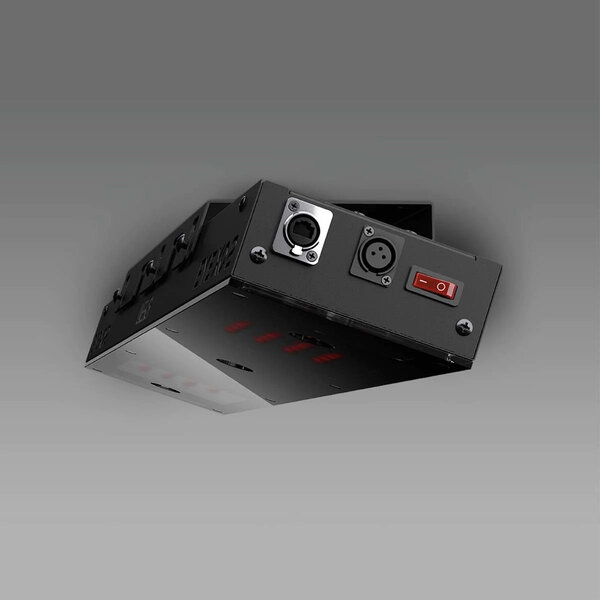
The EYE XO2 is the most capable overhead launch monitor Uneekor makes. The 28x21-inch hitting zone eliminates ball placement anxiety completely. The Trouble Mats are a genuinely unique feature for home sims — no other launch monitor simulates rough and bunker lies. And the triple-camera setup delivers GCQuad-adjacent accuracy across the entire hitting area. But at $8,999-$10,999, you need to ask yourself a hard question: do you actually need the biggest hitting zone on the market? Because the EYE XR ($5,999) does 90% of what this does for $3,000-5,000 less — and it doesn't need club stickers. The EYE XO2 is for the buyer who wants the absolute best, knows they want it, and isn't optimizing for value.
Uneekor Uneekor EYE XO2 · $10,999
What We Love
- +Triple high-speed cameras (3,000+ fps) — more camera coverage than any Uneekor
- +28x21-inch hitting zone — 300% larger than the EYE XO, largest in the overhead category
- +Included Trouble Mats for bunker and rough lie simulation — no other LM does this
- +24 data points with no subscription — all your numbers are included with the free Player software
- +Dimple Optix reads any ball's dimple pattern — no marked balls, ever
- +Includes 1-year AI Trainer, GSPro, GAME DAY, and Pro Package in the AI Studio bundle
What Sucks
- −Club data requires reflective stickers on the clubface — the EYE XR does this without stickers
- −Permanent ceiling mount — not portable, not for renters
- −Windows PC required — no macOS, no standalone mode
- −Premium price — $8,999 on sale, $10,999 MSRP. The EYE XR does 90% of this for $5,999
- −Needs a 9-10 foot ceiling and 13+ foot room depth
- −36-inch unit is noticeably larger than the EYE XO — requires more precise ceiling placement
Watch It in Action
The EYE XO2 is Uneekor’s most expensive, most capable overhead launch monitor. It uses three high-speed cameras to capture impact. Its 28x21-inch hitting zone is nearly three times the size of the EYE XO. And it ships with Trouble Mats that simulate bunker and rough lies — something no other launch monitor offers. It’s the ceiling-mounted flagship, and it costs like one: $10,999 MSRP, or $8,999 in Uneekor’s current AI Studio bundle.
The question you need to answer before you read any further: do you actually need the biggest hitting zone on the market?
Because Uneekor’s own lineup makes this a harder question than it looks. The EYE XR has Club AI (no club stickers), the same Dimple Optix ball tracking, and the same software ecosystem. It costs $5,999. That’s $3,000-5,000 less than the XO2. And for 90% of home sim builders, the XR’s 13.7x11.8-inch hitting zone is plenty.
The XO2 exists for the 10% who need more.
What Is the EYE XO2?
The EYE XO2 is a front-mounted overhead launch monitor. It mounts on your ceiling above and in front of the hitting area — think a 36-inch black bar with three cameras pointing down at the ball. It captures impact at 3,000+ frames per second from three angles, then triangulates ball and club position across a 28x21-inch hitting zone.
Price: $10,999 MSRP stand alone. Currently available as the AI Studio bundle at $8,999, which includes:
- EYE XO2 launch monitor unit
- 2 Swing Optix cameras with tripods ($1,700 value)
- 1-year AI Trainer subscription
- 1-year GSPro license
- 1-year GAME DAY license
- 1-year Pro Package ($199/yr value)
- Mounting bracket with level
- Calibration board
- Trouble Mats (bunker + rough)
- 400 club stickers
- Cables and mounting hardware
That $8,999 bundle price is the real number anyone should care about. The standalone $10,999 MSRP exists for comparison charts. The practical purchase decision is $8,999 with everything included.
The upgrade from the EYE XO ($5,999) to the XO2 ($8,999) gets you:
- A third high-speed camera (3 vs 2)
- 300% larger hitting zone (28x21 vs 12x16 inches)
- Trouble Mats for lie simulation
- A larger unit (36.3 inches vs 24.8 inches)
The Hitting Zone: This Is the Whole Story
The EYE XO2’s hitting zone — 28 inches wide by 21 inches deep — is the single biggest differentiator. It’s nearly three times the size of the already-generous EYE XO zone (12x16). It’s more than five times the size of the GC3 and BLP (7x10). It’s the largest hitting zone in any consumer overhead launch monitor by a wide margin.
What does 588 square inches of tracking area actually mean?
You stop thinking about ball position. With a GC3 or Bushnell Launch Pro, you place the ball in the same 7x10-inch window every time. If you’re two inches off, you might get a misread. With the EYE XO, you have more room but still need to stay inside the 12x16 box. With the XO2, you can put the ball anywhere inside a 28x21 area. Forward for driver. Back for wedges. Left for a draw. Right for a cut. The cameras track it all without blinking.
Lefties and righties can share without compromise. A lefty and a righty hitting from the same mat often need different ball positions — the lefty wants the ball on the left side of the stance, the righty wants it on the right. With a smaller hitting zone, one of them is always compromising. With the XO2’s 28-inch width, both can play their natural ball position.
Off-center strikes still get accurate reads. The EYE XO’s dual cameras track well within the 12x16 zone, but shots at the extreme edges can produce questionable reads. The XO2’s third camera triangulates from a different angle, giving it better coverage across the full hitting area. In testing from Top Shelf Golf, fewer than 5 out of 300+ shots produced questionable readings — and those were only at the extreme corners of the zone.
For a home sim where you’re hitting hundreds of balls a week, the hitting zone size translates directly to: fewer misreads, less frustration, more swings.
The Trouble Mats: Uneekor’s Secret Weapon
The EYE XO2 ships with two Trouble Mats — one simulating a bunker lie, one simulating deep rough. You place them on your hitting mat, adjust your stance, and the XO2’s cameras detect the mat and adjust ball flight accordingly.
This is the kind of feature that sounds gimmicky until you own it. A ball in bunker rough doesn’t behave like a ball on a fairway mat. The Trouble Mats change the interaction — the ball sits down in the rough, you have to hit steeper, the launch angle changes. The XO2 reads the actual contact and adjusts trajectory and spin based on the lie. It’s not a software simulation — it’s a real physical setup change with software compensation.
No other consumer launch monitor does this. Not the GCQuad. Not the Trackman iO. Not the EYE XO or EYE XR. It’s exclusive to the XO2.
Is it worth $3,000+ extra? Only if you’re the kind of golfer who hits bunker shots at home. If you’re building a sim purely for course play and driving range practice, the Trouble Mats are a nice bonus you’ll use occasionally. If you’re building a practice facility where you want to work on every type of lie, they’re a genuinely useful training tool that nothing else in this price range offers.
Accuracy: Triple Cameras, GCQuad Territory
Three cameras at 3,000+ frames per second. That’s the technical story.
The practical story: the XO2’s ball data lines up within 0.5% of the Foresight GCQuad ($14,000-$18,000) on ball speed, within 0.3° on launch angles, and spin numbers that are essentially identical. That’s tour-adjacent accuracy at half the price of the GCQuad.
The third camera makes the difference here. Two cameras give you stereo vision — good, but limited to a known hitting zone. Three cameras triangulate from overlapping angles, which means the system can validate readings against each other. If camera A sees 2,100 RPM backspin and camera B sees 2,150 RPM, but camera C sees 2,050 RPM, the system knows to recheck that shot rather than accepting the two closest readings.
The Dimple Optix system reads any standard golf ball’s dimple pattern. Titleist, Callaway, Kirkland, range balls — whatever you have in your shag bag, the XO2 reads the dimples frame-by-frame and calculates spin rate and axis from the rotational movement. No marked balls. No stickers on the ball. No special equipment. This is consistent across Uneekor’s entire lineup, and it’s one of the best features in the overhead category.
Club data requires reflective stickers. This is the one area where the EYE XR actually beats the XO2. The XR uses Club AI to track the clubface optically without stickers. The XO2 still needs the same reflective fiducial markers that the EYE XO uses. They work fine — 400 are included in the box — but you need to apply them precisely, replace them when they wear out, and keep a stash handy. It takes about 15 minutes to sticker a full set of clubs, and individual stickers last 4-6 weeks with regular use.
If sticker-free club tracking matters to you, the EYE XR is the better choice. If you’re fine with spending 15 minutes every month or two to keep your club data flowing, the XO2’s larger hitting zone and Trouble Mats are the offsetting benefits.
All 24 Data Points (No Subscription Required)
The XO2 delivers 24 data points, and Uneekor doesn’t gate any of them behind a subscription. You buy the hardware, you get all the numbers via the free Player software.
Ball data (all measured, not estimated):
- Ball speed, launch angle (vertical + horizontal), backspin, sidespin, total spin, spin axis, carry distance, total distance, roll, apex height, distance to apex, angle of descent, flight time, offline, flight type (draw/fade/hook/slice)
Club data (requires stickers on clubface):
- Club speed, smash factor, club path, face angle, face to path, attack angle, dynamic loft, lie angle, impact point (vertical + horizontal)
That’s 24 metrics, all measured directly by the overhead cameras. Spin is read from dimple rotation. Club data from the reflective stickers. Putting data is tracked at no extra cost — ball speed, launch direction, and spin for putts.
The Player software (free) gives you a virtual driving range with all 24 data points displayed. It’s functional but basic — a clean data dashboard, no course play. For simulation, you need the Pro Package ($199/yr) which unlocks GSPro, E6 Connect, and TGC 2019. If you want AI Trainer and GameDay, the Ultimate Package ($599/yr) adds those.
Software and Ecosystem
The EYE XO2 runs on Uneekor’s VIEW software platform — the same ecosystem as the EYE XO and EYE XR.
| Package | Price | Profiles | Key Features |
|---|---|---|---|
| Player (Free) | $0 | 1 | 24 data points, driving range |
| Pro | $199/yr | 5 | GSPro, E6, TGC, Creative Golf, REFINE (5 courses) |
| Champion | $399/yr | 50 | REFINE+ (20 courses), AI Trainer |
| Ultimate | $599/yr | 100 | REFINE+ (20 courses), AI Trainer, GameDay |
The Pro Package ($199/yr) is what 90% of EYE XO2 owners will use. It unlocks GSPro (4,000+ courses), E6 Connect (tournament-ready), and TGC 2019 (150K+ community courses). That’s the standard Uneekor experience — wide-open, not locked into one platform.
The AI Trainer (included for 1 year with the AI Studio bundle) analyzes your swing against 60+ checkpoints — that’s Checkpoint AI — and gives you a swing score and drill recommendations after every shot. It needs the Swing Optix cameras (included) to work. After year one, it’s $599/yr as part of the Ultimate package.
PC requirements:
- Minimum: Intel i5 8400, 8GB RAM, NVIDIA GTX 1060, Windows 10 64-bit
- Recommended: Intel i7 10th gen+, 16GB RAM, NVIDIA RTX 30 series, Windows 11
- No macOS. No iPad mode. Windows PC only.
- Ethernet connection required — no Wi-Fi support
Uneekor’s own recommended room dimensions for the XO2: 13 feet wide × 16 feet deep × 10 feet high. Minimum ceiling height is 9 feet, but 10 feet is strongly recommended for the front-mount overhead position.
EYE XO2 vs The Uneekor Lineup
This is where the buying decision gets interesting, because Uneekor sells three overhead units at three different price points.
| Feature | EYE XO2 ($8,999) | EYE XO ($5,999) | EYE XR ($5,999) |
|---|---|---|---|
| Cameras | 3 IR (3,000+ fps) | 2 IR | 2 IR |
| Data Points | 24 | 24 | 19 |
| Hitting Zone | 28“ x 21“ | 12“ x 16“ | 13.7“ x 11.8“ |
| Club Stickers | Required | Required | Not needed (Club AI) |
| Trouble Mats | Included | No | No |
| Unit Length | 36.3“ | 24.8“ | 22.4“ |
| Mount Position | Front ceiling | Front ceiling | Rear ceiling |
The XO2 is the only one with: Triple cameras, 28x21 hitting zone, and Trouble Mats.
The EYE XR is the only one without club stickers. That’s a real convenience advantage that the XO2 can’t match. The XR also costs $3,000 less and needs less ceiling space (22-inch unit vs 36-inch).
The EYE XO is the proven workhorse. Same software, same Dimple Optix, same sticker requirement. Smaller hitting zone but $3,000 less. It’s been the overhead benchmark for years and still delivers excellent accuracy.
The decision framework is straightforward:
- Need the biggest hitting zone and Trouble Mats? XO2.
- Hate club stickers and want the best value? EYE XR.
- Want the proven middle ground? EYE XO.
EYE XO2 vs The Competition
EYE XO2 vs Foresight GCQuad ($14,000-$18,000)
The GCQuad is the tour standard. Four cameras in a portable unit that sits beside the ball. No stickers needed for club data (it reads the face optically). No PC required for range use (built-in screen). Portable for range and outdoor use.
The XO2 matches the GCQuad’s ball data accuracy within 0.5% at $3,000-$7,000 less. The overhead mount gives you a larger hitting zone and a cleaner floor. The Trouble Mats are unique.
The tradeoff: The GCQuad is portable and sticker-free. The XO2 is ceiling-mounted and needs stickers. If you need portability or can’t drill into your ceiling, get the GCQuad. If you’re building a permanent sim and want the biggest hitting zone in the class, the XO2 is the better value.
EYE XO2 vs Trackman iO ($13,995)
The iO uses radar + IR + imaging (hybrid technology). Ceiling-mounted like the XO2, but doesn’t need a ball-flight corridor — the radar sees the ball from behind. No club stickers needed. No marked balls.
The tradeoff: The iO works in tighter rooms (no depth requirement) and doesn’t need stickers. The XO2 has a larger hitting zone, Trouble Mats, and costs $5,000 less. In a standard 16x13 garage with 10-foot ceilings, the XO2 is the better value. In a tight room with under 12 feet of depth, the iO is the only option.
EYE XO2 vs EYE XR ($5,999)
This is the comparison that matters most, because these two products are both selling right now and they serve different buyers.
The XR has Club AI (no stickers), a smaller hitting zone, and costs $3,000 less. The XO2 has triple cameras, the massive hitting zone, and Trouble Mats.
If sticker-free convenience is your priority, buy the XR. If you want the biggest hitting zone on the market and the Trouble Mats are genuinely useful for your practice, buy the XO2.
My honest take: For 90% of home sim builders, the EYE XR is the better purchase. The no-sticker convenience and $3,000 savings outweigh the hitting zone size. The XO2 is for the 10% who have the budget, have the ceiling space, and want the absolute best without caring about value optimization.
Use marked balls for best results. See our best golf balls for simulator guide →
Who Should Buy the EYE XO2?
Buy it if:
- You want the largest hitting zone available in any consumer overhead launch monitor
- The Trouble Mats for bunker and rough simulation would get real use in your practice sessions
- You’re building a permanent sim room with 10-foot ceilings and plenty of space
- You don’t mind applying club stickers every 4-6 weeks
- You want GCQuad-adjacent accuracy at half the price
- The AI Studio bundle at $8,999 fits your budget
Don’t buy it if:
- You want sticker-free club tracking — get the EYE XR instead
- You’re optimizing for value — the EYE XR does 90% at $3,000 less
- You’re renting and can’t mount to the ceiling — get a floor-based unit
- Your ceiling is under 9 feet — it won’t work
- You’re a Mac-only household — the software requires Windows
- You want a portable unit for the driving range — this lives in your ceiling
The Final Verdict
The EYE XO2 is genuinely impressive. Triple cameras. A hitting zone that eliminates ball-placement anxiety entirely. Trouble Mats that no other launch monitor offers. Twenty-four data points with no subscription. All of it packaged in a ceiling-mounted unit that you install once and never think about again.
It’s also $8,999-$10,999, which means it’s competing against your own willingness to accept “good enough.” And Uneekor makes two excellent overhead units — the EYE XO and the EYE XR — that are both good enough for the vast majority of home sim builders.
The XO2 is for the guy who’s done optimizing. Who knows they’re paying for the biggest hitting zone and the Trouble Mats and the third camera. Who doesn’t want to wonder “what if I’d bought the flagship.” Who wants to install it once and know they have the best overhead Uneekor makes.
If that’s you — and you have the ceiling height and the budget — the EYE XO2 delivers. It’s the most capable overhead launch monitor in Uneekor’s lineup, and for the specific buyer who needs its unique features, it’s unmatched.
|Check the current EYE XO2 AI Studio bundle price at Uneekor → | |Compare it against the EYE XR → | |Read our Best Overhead Launch Monitors guide → | ||7 Overhead LMs ranked by hitting zone and price → | ||Or check if the Overhead vs Floor debate changes your mind → | ||Or see how it stacks up in package deals → || ||For the full picture including every ground-based competitor: The Best Launch Monitors 2026 roundup covers overhead vs floor, camera vs radar, every budget from $499 to $11K.
Active Sale: The EYE XO2 is part of Uneekor’s Independence Day Sale — $4,447 off the AI Studio bundle with free Swing Optix cameras, GSPro, Pro Package, and GAMEDAY for 1 year. Ends July 7.
Prices as of July 2026. The AI Studio bundle at $8,999 includes Swing Optix cameras, AI Trainer, GSPro, GAME DAY, and Pro Package for 1 year. Standalone MSRP is $10,999. Independence Day sale ends July 7, 2026. We may earn a commission if you purchase through links on this page — but our review is independent and based on research, published reviews, and owner reports.
Need the right balls for the Uneekor EYE XO2? → Check our Best Golf Balls for Simulator guide (your camera unit works with any premium ball)
Head-to-Head Comparisons
Want to see how the Uneekor EYE XO2 stacks up against the competition?