SC4 Pro vs R10 vs MLM2Pro: $400-600 Shootout
The Sub-$600 Portable Launch Monitor Shootout
SC4 Pro ($499, display), R10 ($499, ecosystem), MLM2Pro ($599, camera spin). Three sub-$600 portables with different strengths. One belongs in your bag.
The Short Answer
SC4 Pro ($499, display), R10 ($499, ecosystem), MLM2Pro ($599, camera spin). Three sub-$600 portables with different strengths. One belongs in your bag.
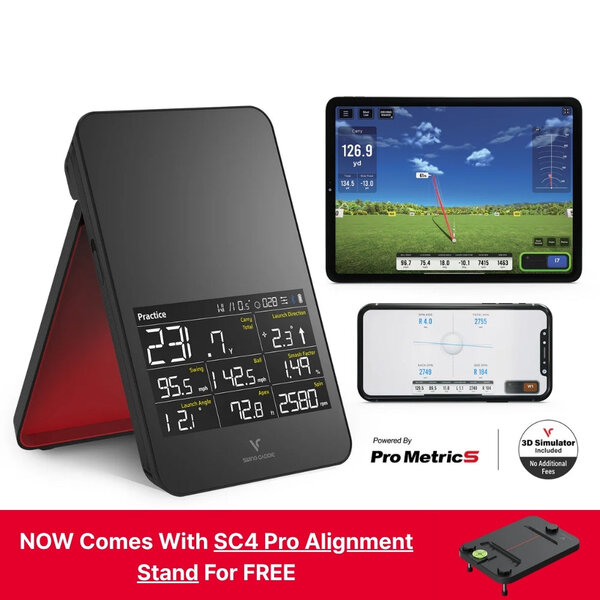
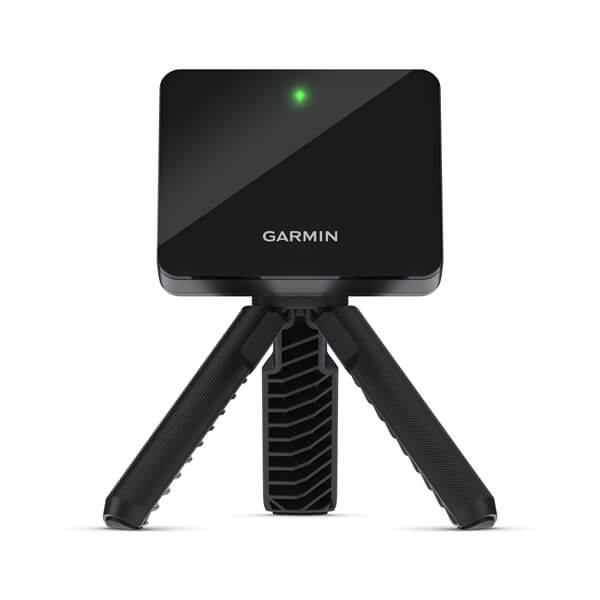
Three devices. Same price range. Completely different answers to the same question: “what’s the best way to get golf data for under $600?”
I get asked this a lot. Like, multiple times a week. And the honest answer is: it depends on what kind of golfer you are. But I’ll give you the cheat sheet before we dive into the details: if you want the least friction, get the SC4 Pro. If you want the best sim upgrade path, get the R10. If you want the most accurate data and hate subscriptions, get neither — get a Square Golf Home Edition or wait for the SC4 Pro refresh that includes spin axis.
Let me show you why.
The Quick Comparison
| SC4 Pro | Garmin R10 | MLM2Pro | |
|---|---|---|---|
| Street price | $499 | $400-499 | $599 |
| Technology | K-band radar | Doppler radar | Camera + Doppler |
| Built-in display | Yes (voice too) | No | No |
| Data metrics | 9 | 7-9 | 12+ |
| Spin measurement | Estimated (radar) | Estimated (radar) | Camera-measured |
| GSPro compatible | Via connector | Yes (1 click) | Yes (add-on) |
| E6 Connect | 5 courses included | No | Subscription add-on |
| Swing video | No | No | Yes (iPhone) |
| Subscription | $0 base | $0 base | $199/yr (or capped) |
| Indoor/Outdoor | Both | Both (18ft+) | Both (flight-limited) |
| Room depth min | ~12 ft | ~18 ft | ~12 ft |
| Best For | Friction-free practice | Sim upgrade path | Data accuracy nerds |
Voice Caddie SC4 Pro: The Friction-Killer
The SC4 Pro is the only launch monitor under $600 with a built-in display and voice feedback. You take it out of the box, turn it on, and it starts showing you numbers. No phone pairing. No app download. No Bluetooth handshake. Just data.
This matters way more than people think.
I’ve watched friends pull out their phones at the range, fumble with Bluetooth, wait for the app to load, miss the connection, restart the app, and then hit three balls before realizing the device never paired. The phone becomes a bottleneck between you and hitting golf balls.
The SC4 Pro eliminates that entirely. The display shows ball speed, club speed, smash factor, carry distance, total distance, launch angle, launch direction, spin rate, and spin axis. It speaks them aloud if you want — hence “Voice Caddie.” You hit, you look down, you hear your numbers, you hit again. It’s the closest thing to a Trackman experience at a fraction of the price.
What it does well:
The K-band radar is surprisingly consistent for the price. Multiple independent tests show carry distance within 3-4 yards of a GCQuad across mid-irons and woods. Wedge and driver accuracy dips a bit — short shots don’t generate enough ball speed for consistent radar tracking, and high clubhead speeds introduce more variance. But for the middle of the bag, it’s shockingly good.
The five included E6 Connect courses are a genuine bonus. Most budget LMs give you a driving range or nothing. The SC4 Pro hands you five real courses with the purchase price. You need an iPad or PC to play them, but they’re included. No extra fee.
The form factor is excellent. It’s the size of a small speaker. Fits in a golf bag pocket. Battery lasts about 8 hours. The magnetic charging stand is a nice touch — drop it on, it charges, no cable fumbling.
Where it falls short:
No GSPro support without a third-party connector. This is the biggest limitation for sim builders. The R10 connects to GSPro with one click. The MLM2Pro connects via an add-on. The SC4 Pro needs a community-built bridge that’s finicky at best.
Spin axis is calculated, not measured. The K-band radar estimates spin from ball flight — it’s good at identifying draw vs fade direction, but the actual axis number is an approximation. For most practice, that’s fine. For detailed shot shaping work, it’s a limitation.
The app is functional but uninspired. Voice Caddie’s native app gives you practice sessions, swing tempo, and basic stats. It works. It’s not as polished as Garmin’s Golf app or Rapsodo’s range experience. But again — you don’t need the app to use the device. That’s the whole point.
Who should buy it: The range regular who wants instant data without tech friction. The golfer who hates phone pairing. The person who wants to hit balls and get numbers, not fumble with connections.
Garmin R10: The Gateway Drug
The Garmin R10 is the most popular budget launch monitor ever made, and for good reason. It’s been on the market since 2021, has thousands of community-validated reviews, and costs between $400 and $499 depending on where you buy it. It’s the Honda Civic of launch monitors — not flashy, not the fastest, but reliable, well-supported, and Garmin’s ecosystem is massive.
What it does well:
GSPro support with zero friction. You connect the R10 to your PC via the Home Tee Hero app, open GSPro, and it works. No extra subscription. No bridge software. No third-party dongle. This single feature makes the R10 the default budget choice for anyone building a home sim.
Garmin’s Golf app is excellent. The range experience is polished — target mode, stack training, club gapping, swing tempo drills. It’s the most feature-rich free app in the budget LM space. The R10 also integrates with Garmin’s ecosystem: your round data syncs with the Garmin Golf app, your Approach watch can track shots, your G82 (if you have one) talks to the same account.
Community support is unmatched. If you have a problem with an R10, five thousand people on Reddit have already solved it. The r/Golfsimulator subreddit has more R10 troubleshooting content than any other single device. That matters for a first-time buyer.
The price point is aggressive. Street price bounces between $400 and $499. Used units regularly sell for $300-350 on eBay. If you’re on a tight budget and want sim capability, the R10 is the cheapest way in.
Where it falls short:
Room depth is a real problem. The R10 needs 18 feet of total ball flight to get good indoor reads. That’s 7 feet behind the ball for the device, 8-10 feet of ball flight, plus the screen/net at the end. If your garage is under 18 feet deep, check the space requirements guide — the R10 will struggle without enough room. Period.
Spin data is estimated, and it shows. The Doppler radar guesses spin from ball flight patterns. On well-struck mid-irons, it’s close. On mishits, wedges, and driver, the variance widens. Compared to the MLM2Pro’s camera-measured spin, the R10’s spin numbers are noticeably less consistent.
No E6 Connect integration without a separate subscription. The R10 works with Home Tee Hero (free, decent) and GSPro ($250/yr, excellent). But if you want E6’s course library, you need a separate E6 subscription on top of everything else.
The build is plasticky. It works, it survives drops, but it doesn’t feel premium. The flip-up design with the charging cable placement is functional but clumsy. After three years of production runs, it still feels like a prototype that shipped.
Who should buy it: The budget sim builder who wants GSPro at the lowest possible entry point. The guy who has 18 feet of room and wants a proven, community-supported device.
Rapsodo MLM2Pro: The Data Nerd’s Choice
The MLM2Pro is the only device in this comparison that measures spin with a camera. It’s not estimating — it’s watching the ball rotate through two high-speed infrared cameras and calculating spin directly from visual data. That single distinction makes it the most accurate device here on the data that matters most.
What it does well:
Camera-measured spin is a genuine differentiator. Radar estimates spin from ball flight — it infers backspin from how the ball moves through the air. The MLM2Pro actually sees the ball spinning. The difference shows up most clearly on wedge shots, where spin rate directly affects stopping power. If you’re working on spin control, the MLM2Pro gives you real numbers, not guesses.
Swing video is the other exclusive feature. The MLM2Pro records your swing at 240 fps using your iPhone’s camera, overlays data on the video, and lets you review frame by frame. No other device in this price range has built-in swing video. If you’re a visual learner who needs to see your swing alongside your data, this is a compelling reason to pick the MLM2Pro.
Rapsodo’s range experience is polished. The app gives you 36,000 simulated courses in “flight-limited” mode — you see your ball fly through the course environment on screen. It’s not a full sim experience, but it’s visually engaging and makes range practice feel like play.
The 6-month Pay With Practice plan is an underrated value: $499 for the device, $20/mo for 24 months, and if you use the device 40+ times in a six-month period, they refund the first 18 months of subscription fees. For a committed range regular, the device effectively costs $499 with 6 months free.
Where it falls short:
The $199/yr subscription is the elephant in the room. After one year, the MLM2Pro costs $798. After two years, $997. After three years, $1,196. That’s more than a Square Golf Home Edition ($699, no sub, camera-based). The subscription is for app access, data storage, and course modes. Without it, you get a basic range mode that severely limits the device’s value.
Flight-limited indoor use is another issue. The MLM2Pro uses both cameras and radar, but indoors, the radar component limits ball flight data to about 25 yards of calculated carry. You get spin, launch angle, and ball speed — but carry distance indoors is calculated, not measured. For outdoor range use, the radar picks up full ball flight and carry matches real-world results.
Phone dependency is complete. The MLM2Pro has no display, no voice feedback, no standalone mode. Without your iPhone, the device does nothing. The SC4 Pro works without a phone. The R10 has a basic LED display for club speed and ball speed. The MLM2Pro requires a phone for everything.
Who should buy it: The data-obsessed range golfer who wants real spin numbers and swing video. The guy who already has an iPhone and doesn’t mind the subscription because he uses it 3+ times a week.
The Honest Verdict
Here’s the truth: these three devices don’t actually compete against each other. They compete against — you, the buyer — and what you actually want to do with your golf practice.
Buy the SC4 Pro ($499) if: You don’t want to use your phone. You want data immediately, every single time, no setup. You hit mid-irons and woods at the range and want reliable carry numbers. The built-in display and voice feedback are not gimmicks — they’re the whole point. The SC4 Pro is the least annoying launch monitor in this category, and for the guy who just wants to hit balls and get numbers, that’s the decisive advantage.
Buy the Garmin R10 ($400-499) if: You’re building a home sim. You have 18+ feet of room depth. You want GSPro compatibility at the lowest possible entry price ($499 device + $250/yr GSPro = $749 total). The R10 is the most proven, most community-supported device here, and Garmin’s ecosystem keeps getting better. It’s the safe choice, and safe is fine when you’re spending your own money.
Buy the MLM2Pro ($599 + $199/yr) if: Spin accuracy matters more than cost. You want swing video built into your practice. You primarily practice outdoors at the range. And you’re comfortable with the subscription math — $1,196 over three years for the device that gives you the most accurate spin data and the best range experience.
For the mass buyer — the guy who wants one device for the range and maybe a casual sim setup down the road — the SC4 Pro is the pick. It’s $499, works out of the box, has 9 data metrics, gives you 5 real E6 Connect courses, and doesn’t require a phone to function. The only significant gap is GSPro compatibility, and if that matters to you, get the R10 instead.
Either way, you’re getting a legitimately useful practice tool for under $500. That wasn’t possible three years ago. The fact that we’re debating which version of sub-$600 data you want is a win for everyone who loves golf.
Check SC4 Pro pricing → · Check Garmin R10 pricing → · Check MLM2Pro pricing → · Full SC4 Pro review → · Garmin R10 review → · MLM2Pro review → · Best launch monitors 2026 →
FAQ
Which of these is best for a home golf simulator? The Garmin R10. GSPro compatibility is seamless, the community support is unmatched, and the device is proven with thousands of sim users. The SC4 Pro doesn’t natively support GSPro. The MLM2Pro supports it but needs an add-on subscription.
Does the SC4 Pro work without a phone? Yes. That’s its whole thing. Built-in display shows 9 data metrics. Voice feedback reads them aloud. You never open an app. This is unique at this price point.
Is the MLM2Pro subscription really required? For full functionality, yes. The $199/yr subscription unlocks the range modes, course library, data storage, and swing video. Without it, you get basic ball data only. The SC4 Pro and R10 have no subscription requirement for base use.
Which one has the most accurate spin data? The MLM2Pro. It’s the only device here that measures spin with cameras rather than estimating it from radar. The difference is most noticeable on wedge shots and short irons.
What room depth do I need for each? SC4 Pro: ~12 feet minimum. R10: ~18 feet minimum. MLM2Pro: ~12 feet indoors (but carry is calculated, not measured). For the R10, measure your space before buying — the 18-foot requirement is real and non-negotiable.
Can any of these work outdoors on a grass range? All three work outdoors. The SC4 Pro and R10 use radar and need clear ball flight. The MLM2Pro works on grass but needs the range mode for full outdoor ball flight tracking.
Related: SC4 Pro Review | Garmin R10 Review | MLM2Pro Review | 5-Year Total Cost of Ownership | Best Budget Launch Monitors
The SC4 Pro is the best sub-$600 portable launch monitor for the mass buyer — built-in display, voice feedback, 9 data metrics, 5 free E6 courses, and no phone required. The R10 is the better sim gateway with GSPro support at a proven price. The MLM2Pro has camera-measured spin and swing video but gets locked into a $199/yr subscription that changes the math after year one. For most people, the Voice Caddie SC4 Pro is the better choice.